SysML2 Workflow — Edit → Validate → Render → Build
This document describes the end-to-end workflow for authoring, validating, rendering, and publishing SysML2 model artifacts in this repository.
Workflow Overview
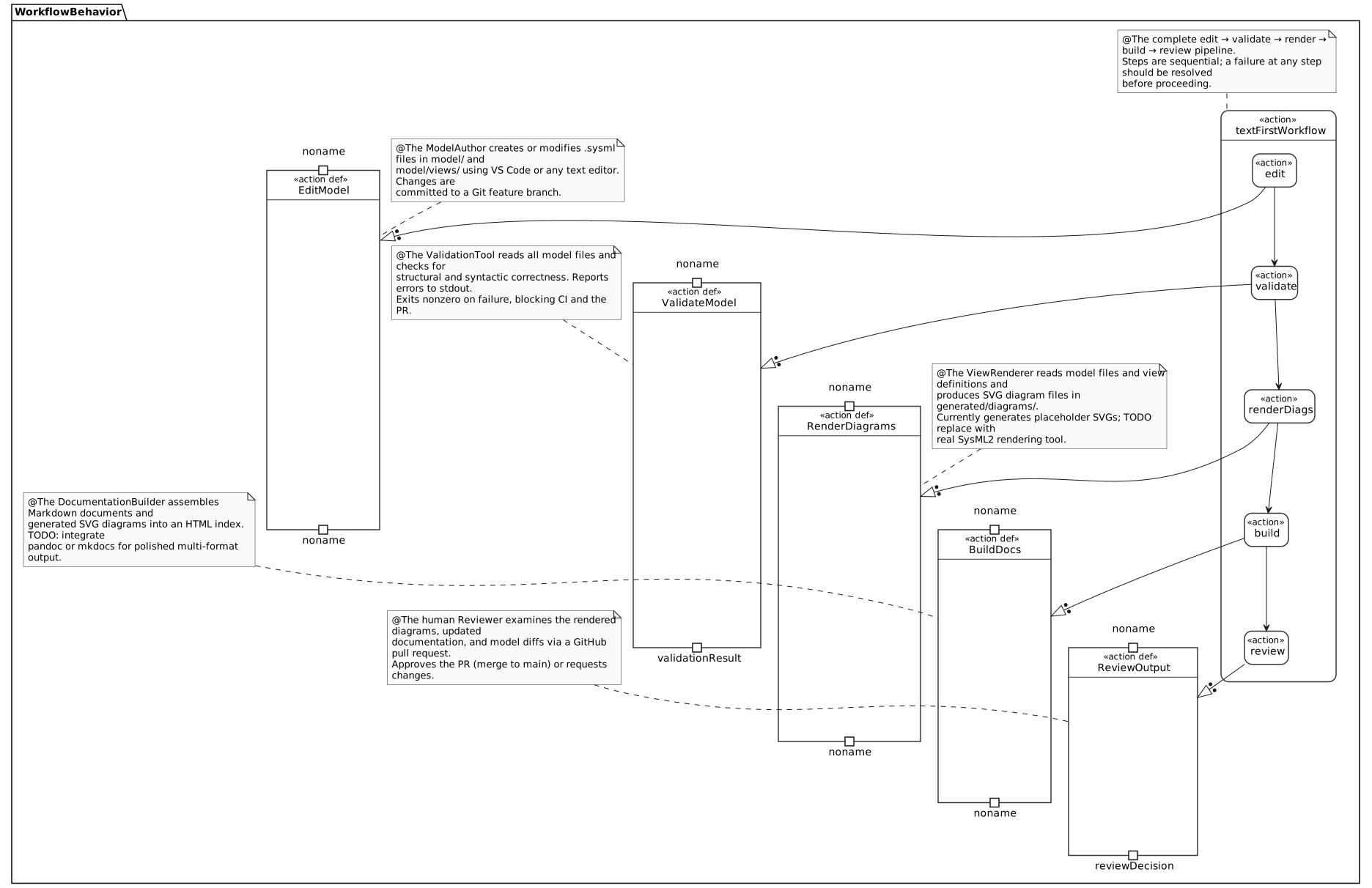
 ┌──────────┐    ┌──────────────┐    ┌────────────────┐    ┌────────────┐
 │  Edit    │───►│  Validate    │───►│  Render        │───►│  Build     │
 │ .sysml   │    │  model files │    │  diagrams      │    │  docs      │
 └──────────┘    └──────────────┘    └────────────────┘    └────────────┘
     │                  │                    │                    │
  VS Code           scripts/            scripts/            scripts/
  or editor     validate-model      render-diagrams        build-docs
Each step is implemented as a standalone shell script in scripts/ and as a VS Code task in .vscode/tasks.json. The same scripts are invoked by GitHub Actions on every push and pull request.
Step 1: Edit
Tool: VS Code (recommended) or any text editor
Files: model/*.sysml, model/views/*.sysml
Model artifacts are plain-text SysML2 files. There is no GUI modeling tool required. Authors edit files directly and commit changes to a Git branch.
The recommended VS Code extensions (.vscode/extensions.json) provide:
Syntax highlighting for
.sysmlfiles (when a SysML2 extension is available)Markdown preview for documentation files
GitLens for change tracking
Step 2: Validate
Script: scripts/validate-model
VS Code Task: Validate Model
The validate script loads all model files into the OMG SysML v2 Pilot Implementation interactive kernel (SysMLInteractive) in dependency order, checking that every file parses without errors.
A non-zero exit code from the validate script causes the GitHub Actions validate.yml workflow to fail, blocking the PR.
Step 3: Render
Script: scripts/render-diagrams
VS Code Task: Render Diagrams
Output: generated/diagrams/*.svg
The render script loads the model into SysMLInteractive, issues %viz commands for each diagram element, and pipes the PlantUML output through tools/SysMLRender.java, which renders each block to SVG using the PlantUML library bundled in the OMG JAR.
Generated SVGs are committed to the repository in generated/diagrams/ so that documentation is always renderable without running the script locally.
Step 4: Build Docs
Script: scripts/build-docs
VS Code Task: Build Docs
Output: generated/docs/index.html
The build-docs script builds a navigable HTML documentation site from the Markdown sources using
Sphinx with the MyST parser
and the sphinx_rtd_theme. The generated site includes a table of contents, search, and the SVG
diagrams embedded in workflow.md via standard Markdown image links.
Dependencies are declared in docs/requirements.txt and installed by scripts/setup-tools.
The repository also includes a .readthedocs.yaml configuration file. Connecting the repository
to Read the Docs will build and host the documentation automatically on
every push, with versioned builds per branch and tag.
How Model Files, Views, Diagrams, and Docs Relate
model/
  requirements.sysml  ─────────────────────────────────► (referenced in docs)
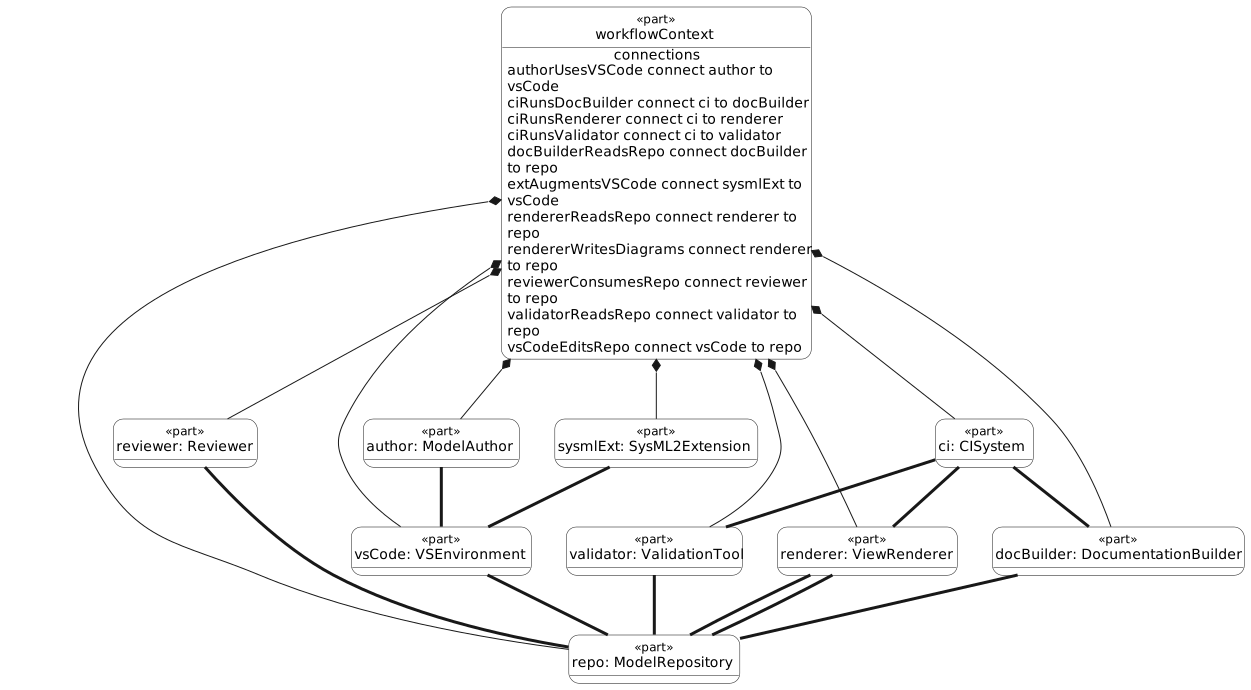
  context.sysml       ──► model/views/context-view.sysml
  workflow.sysml      ──► model/views/artifact-flow-view.sysml

model/views/
  context-view.sysml         ──► generated/diagrams/context.svg
  artifact-flow-view.sysml   ──► generated/diagrams/artifact-flow.svg

generated/diagrams/
  context.svg         ──► embedded in docs/workflow.md
  artifact-flow.svg   ──► embedded in docs/workflow.md

docs/
  overview.md         ──► rendered in GitHub / VS Code preview / Sphinx HTML
  workflow.md         ──► rendered in GitHub / VS Code preview / Sphinx HTML
GitHub PR Review as V&V
The GitHub pull request process serves as the formal Verification & Validation gate:
AI agent (or any author) creates a feature branch and drafts model artifacts
Author opens a Pull Request targeting
mainGitHub Actions automatically runs
validate-model,render-diagrams, andbuild-docsIf any script fails (non-zero exit), the PR is blocked
Human Reviewer (V&V role) reviews:
The
.sysmlmodel diffs for correctness and completenessThe rendered SVG diagrams (visible in the PR diff and in
generated/diagrams/)The updated documentation in
docs/
Reviewer approves the PR, triggering merge to
main
This process ensures that no model change reaches main without human review of both the text artifact and the rendered output.
Running the Full Pipeline
# From the repository root:
scripts/validate-model   # Step 2: Validate
scripts/render-diagrams  # Step 3: Render
scripts/build-docs       # Step 4: Build

# Or use the VS Code "Build All" task which runs them in sequence.